
GET SUPPORT FOR YOUR BUSINESS INTERNET
Facing problems with your business internet? Find answers in our FAQs and practical guides.
Business Fiber FAQ
Upgrade, Downgrade & Termination
Yes. For assistance, please contact us at [email protected].
No, downgrading is not allowed within contract period.
If you terminate a 12- or 24-month contract, you must pay an Early Termination Penalty (ETP) for the remaining contractual days.
Pricing & Contracts
Customers can choose between 0, 12, or 24 months.
- 0-month contract: Requires an RM1,200 upfront charge, no free bundle items
(router/voice). - 12-month contract: Includes additional RM66/month.
- 24-month contract: No additional charges, eligible for free devices.
Additional Service
No, but customers can purchase up to 5 Fixed IPs:
- 1 Fixed IP = RM200
For assistance, please contact us at [email protected]
- Yes, a free voice line (local calls only, IDD not included) is included with our 300Mbps, 600Mbps, 1Gbps and 2Gbps plans.
- Customers can also purchase an additional Business Voice Line (BVL) for RM45/month, which includes 2 voice lines.
For further assistance, please contact us at [email protected]
The subscription comes with 1 voice line with no rental charge. If you need more voice lines, you may subscribe for the Time Basic Voice Line.
Time Basic Voice Line is a fixed voice line service that provides incoming and outgoing calls to subscribers. It comes with 2 voice lines with a RM45 monthly rental and domestic calls at RM0.13 per minute.
The minimum contract period is 12 months with a one-time registration fee. The registration fee is waived for 24-month contract periods and above.
We have three bundled services available for you to choose from:
- Standard VAS – CLIP, Call Forwarding, Direct Dialling.
- Plus VAS – Call Waiting*, Call Barring, Call Transfer*,
Call Pick-up*, Multi Conference*, Extension
Dialing*(Features may not be available at your
location). - Toll Free VAS – 1800 Freephone and 1300 Toll Free
The subscription comes with 1 voice line with no rental charge. If you need more voice lines, you may subscribe to the Time Basic Voice Line.
General Information
Drop your details here and we’ll get in touch with you. Alternatively, you may subscribe via a Time authorised dealer.
You can reach out to us at [email protected] to withdraw your request.
You may be required to pay the following one-time service fees, which will be included in your first bill:
- Special Building Requirement Fee – subject to your Building Management
- Deposit (foreign-registered company) – RM1,000 (refundable)
Yes, provided the plan suits your requirements. Please note that any downgrade is subject to TIME’s approval. There are no penalty charges for plan upgrades or downgrades; however, any existing discounts will not be transferred to the new plan.
Yes. All your existing VAS subscriptions will remain.
Yes, this is allowed. However, charges will apply for the remaining months of your contract.
You must provide us with 30 days’ notice of any intention to cancel your subscription by reaching out to us at [email protected].
Please complete the form to submit your request and select “Indoor/Outdoor Relocation” under the modification type. The applicable charges are as follows:
Relocation within the same unit: RM90
Relocation to another unit in the same building or to a different building: RM129
Relocation is only permitted for selected buildings.
You can reach out to us at [email protected] to withdraw your request.
Yes, this is possible. However, please ensure that your new address is within Time coverage area, as relocation is only available for selected buildings.
You may inform our service installers when they contact you one day before the appointment. Alternatively, you can email us at [email protected] to notify us in advance.
No, cables are not required for standard installation as they will be provided by our service installers. However, please bring your existing ONU, router, and power adapters to the new location and ensure that all devices are kept in good condition.
You will need to email the following documents to us at [email protected]:
Transfer of Ownership Form One and Form Two
Copy of the new owner’s NRIC/passport (front and back)
(a) Photocopy of Form 8/9, Form 24, and Form 29 for companies incorporated under the Companies Act 1965; or
(b) A certificate and documents issued by relevant authorities for an NGO/Association/Cooperative; or
(c) Photocopy of Form D & A (Sole Proprietor); or
(d) Photocopy of Form D & B (Partnership).
Please note that you will need to clear any outstanding payment before submitting the request. Visit quickpay.time.com.my to check your balance and make payment.
The request will be completed within 30 calendar days from the submission date. From that date onward, the new owner will be responsible for all bill payments.
Once the transfer of ownership is completed, the nominee may request a service relocation via modification.time.com.my/ftto.
From your Self Care dashboard, select Manage Plan > Terminate Service, complete the form, and submit your request.
Please note that a 30-day notice period is required for service termination.
Yes, charges will apply for the remaining months of your contract.
We regret that the penalty cannot be waived, as the 24-month contract is tied to the current location. As an alternative, you may transfer the account to another individual to avoid the penalty. Please refer to the Transfer of Ownership section for more details.
The service will be terminated on the date stated in your termination form.
The final bill will be generated on the next bill cycle after the service is terminated.
The refund (if any) will be processed within 90 days of the final bill generation. You may check your bank account for details.
We can make a transfer to your overseas bank account provided the amount is above USD50 or RM250. Payment will only be in USD. If the amount is less than USD50, we are only able to refund to a local bank account.
We will only refund to the bank account of the service owner to prevent confusion and disputes.
Yes, you can still withdraw your request up to 3 working days before the termination date. Reach out to us at [email protected] for further assistance.
We will send an electronic bill to your registered email address every month.
This depends on your billing cycle and that’s determined after your service is activated. You may notice pro-rated charges in your first bill.
Your monthly bill will include your broadband subscription fee, voice service usage charges and subscription fee(s) for other value-added service(s), if any.
There could be a few reasons why your bill didn’t make it to your inbox:
- Invalid email address: There might be typos or formatting errors.
- Inactive email: The email address might no longer be active.
- Full inbox: Your inbox may be full and unable to receive new emails.
- Blocked mailbox: Your email provider may have blocked our messages.
- Spam or Junk folder: Please check your spam or junk folder.
If you’re still facing issues, please write to us for further assistance.
- 300Mbps: WiFi 6 Router
- 600Mbps: WiFi 6 Router + WiFi 6 Mesh
- 1Gbps: WiFi 7 router + WiFi 6 Mesh
- 2Gbps: 10gpon High End Router + WiFi 6 Mesh
A RM80 installation fee applies if customers do not purchase a device during activation or recontract.
Customers can purchase additional devices:
- WiFi 6 Router: RM299 (1 unit)
- WiFi 7 Router: RM399 (1 unit)
We can get your service up as soon as 3 days after you sign up, but the date and time is subject to availability.
A standard installation typically takes about 2 to 4 hours, but the duration will also depend on your building type. Our installers will get in touch with more information before your appointment.
We provide basic cabling services of up to 20 metres from point-of-entry i.e. main door (6 metres from the socket for buildings with pre-laid fibre) to the location you have designated for your equipment (e.g. router). Should relocation be required in the future, charges will apply based on the cabling material and manpower required. Additional charges may apply for requests beyond the basic cabling services we provide depending on your requirements. Please ask for the approved rate card to confirm cost to be incurred (if any), which are payable directly to the Time-appointed installer.
Installations can only be carried out by Time-appointed installers, who are technically trained to provision the service according to our guidelines.
Yes, you can but you will be charged RM80.
When you place a mesh node in a WiFi dead zone, the node will capture and broadcast the wireless signal and speed of your router to hard-to-reach corners of your workspace. By placing mesh nodes in strategic spots throughout your premises, you can create a seamless, stable WiFi network that keeps your business connected.
You will receive a complimentary router with your new subscription of Time Business Fibre. You’ll also have the option to add on more devices during the signup process.
If you’re an existing Time Business Fibre subscriber, you can purchase our devices from the Self Care shop or upgrade your plan to redeem free devices
A mesh-enabled router means the device is equipped with mesh capabilities. A traditional Mesh WiFi setup typically requires a mesh node to be placed next to the router to act as a gateway. Since our routers are mesh-ready, we eliminate the need for an extra device. All you have to do is place mesh nodes where your WiFi signals are weaker and you’re ready to enjoy strong and seamless WiFi all over your business premises.
You can pay for our WiFi devices purchased during the signup process using your credit/debit card or through the Self Care shop using online banking, credit/debit card or e-wallet.
Unfortunately, any request for a return/refund/exchange will not be entertained as all purchases are final.
Our Tech Ninjas or Time-authorised installers will do it for you.
You may keep the devices you purchased regardless of early termination or contract expiration.
By default, the WiFi 6 (Huawei HG8145X6) device works as a wireless Optical Network Terminal (ONT) or a 2-in-1 device which combines router and Optical Network Unit (ONU) capabilities. That means that you just need 1 device to connect to the Internet, rather than the 2 (router and ONU) typically needed.
Another feature of the WiFi 6 device is that it can function as a router or a mesh node.
So, if you already have an existing ONU or encounter building limitations that require you to use one, you can switch your WiFi 6 device to router mode. Similarly, if you wish to use your WiFi 6 device as a mesh node to extend coverage, you can follow the same steps.
- Power on the device and wait until it is fully booted up. The power button light and WLAN indicator will be stable.
- Press the WPS button until all the LED indicators on the top of the device light up and then release the button.
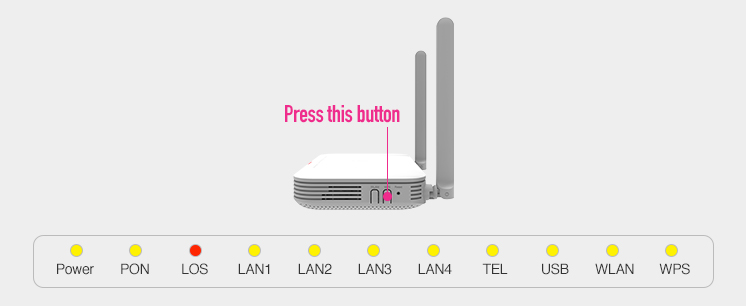
- This action reboots the device.
- Once it has successfully booted up again, it will be in router/mesh node mode. The WPS LED indicator will be continuously lit up in this mode.

To return the device to its ONT mode, simply follow the same steps. In ONT mode, the WPS LED indicator will not be lit up.
You may refer to the official website of the device you have purchased to check on compatible mesh devices with your router.
The Optical Network Unit (ONU) connects to the fibre termination point via an optical fibre cable. It then connects to your router through an ethernet cable. The ONU is also called the modem.
All equipment we provide are covered by a limited warranty during your contract period. Any loss or damage due to negligence or abuse is not covered under the warranty, and any requests for replacements are chargeable.
All devices provided by TIME come with official warranty protection for your peace of mind.
Routers & Mesh Nodes
Covered under a 2-year limited warranty, applicable to all units supplied by TIME.ONU (Optical Network Unit)
Comes with a lifetime warranty, as long as the service remains active and the device is not physically damaged or misused.
This ensures long-term reliability and support for essential network equipment throughout your subscription period
- Self Care is a self-service portal that lets you manage your account and subscribed service(s), pay your bills and diagnose your connection all in one place.
We’ve already registered a Self Care account for you. You can check your registered email address or SMS for your username and password. The password will expire in 60 days so make sure to log in before then.
Your default Username is your MyKad/passport/business registration number. This cannot be changed.
Click the “Forgot Password?” link on the Self Care login page. You will need to enter your Account Number and your MyKad/passport number to receive a password reset link via your registered email.
Click on your profile icon at the top right of your screen and select “Change Password” from the dropdown menu.
We recommend that you do this every 3 months to ensure the security of your account.
Try checking the junk or spam folder in your email. If you can’t find it or have yet to receive it, reach out to us at [email protected] for assistance.
Click on the password reset link and input your new password. Sign into Self Care using your new password and remember to use the same password for future logins.
If you encounter any issues with logging in, you can try resetting your password first. Otherwise, reach out to us at [email protected] or 1800-18-2828 for assistance.
To reach out to us, you can write to us at [email protected].
We encourage you to approach these channels for assistance first before lodging a complaint with MCMC.
You will receive an acknowledgement from us via email. We will then begin our investigation and contact you should we need more information.
Please ensure you provide us with the latest contact information so that we may reach you.
To smoothen the process, we recommend that you use this template:
Full name (as per MyKad/passport):
NRIC/Passport number:
Phone number:
Email address:
Account number
Nature and detailed description of the issue:
We will temporarily resolve the case if we fail to reach you after 3 staggered attempts. You will receive an email informing you of the case closure. However, you can reach out to us again to reopen the case.
This depends on the complexity of the complaint. We endeavour to resolve simple cases within 3 working days, while complex cases involving many parties may take up to 10 working days.
Access to the Internet on Port 25 (SMTP) is not allowed to safeguard against any involvement in spamming activities including sending unsolicited e-mails, receiving responses by any means from unsolicited bulk/commercial e-mails sent via service providers. For further information, kindly refer to here.
TIME Fibre Business FAQ
TIME Fibre Business is a high speed Internet access service brought to you by TIME dotCom Berhad (referred subsequently as “TIME”) specially designed for business customers. This service offers a high-speed, reliable Internet connection utilising a state-of-the-art fibre optic network. With the high-speed bandwidth, it is ideal for supporting most business broadband applications such as sending data, emailing, web surfing, video streaming and conferencing, e-commerce and other Internet based applications.
TIME Fibre Internet™ Basic runs on 100% pure fibre optic network up to customer premises which is also capable of giving you high speed Internet of up to 50Mbps.
You do not need a phone line to be connected to the service. However, a fibre optic connection into your home would be required for this service. TIME provides complete installation services into your home for your convenience.
Yes. You will be bound to a 24-month contract period upon subscription unless stated otherwise.
Please refer to Business Fibre page
Yes, these are the service charges for TIME Fibre Internet™ Basic packages:
– Installation fee of RM249 is waived for 24-month package (applicable to all TIME Fibre Internet™ packages).
– * Zero entry cost: Equipment deposit of RM300 and one month advance fee waived.
Yes, you can subscribe based on the additional charges.
Yes, you can subscribe based on the charges.
TIME shall provide basic cabling services and a wall-socket installation to one location within the customer’s premises that is within 10 meters. Any additional cabling work will need to be borne by the customer directly with the contractor.
No. There will not be a need to purchase additional equipment in order to get connected to TIME Fibre Business. TIME will supply the necessary equipment.
You can find the warranty period for the customer premises equipment as below:
| Equipments | Warranty Period |
| Optical Network Unit (ONU) | Lifetime warranty |
| Basic Router | 1 year warranty/1 time replacement |
*The warranty will void once the replacement is done. Once the warranty period has expired, customer is responsible to replace or repair the faulty equipment at their own cost.
You can find the charges as below:
| Details | Price(RM) |
| Ad-hoc configuration of customer’s equipment (routers, modems) On-site support and troubleshooting | RM80/hour |
All TIME Fibre Internet™ Basic equipment provided by TIME will be covered by a limited warranty by TIME throughout the duration of the contract period. However, the loss of equipment or damage due to the customer’s negligence or abuse will not be covered. TIME will provide replacement equipment which will be charged to the customer. Please call our 24-hour Customer Service Centre at 1800 18 1818 for further information.
You may sign-up for this service via the application page here.
Business customers are required to provide:
- Photocopy of Form 24 or Form 49 (Company), Form 13 (if applicable) or.
- Photocopy of Form D & A (Sole Proprietorship) or
- Form D & B (Partnership) or
- Form 79 or Form 80 or Form 80a or Form 83 or Form 83a (foreign company) or
- For NGO/Association/Cooperative; certificate of practice issued by the relevant authority
Configuration and activation shall be done on a default and standard requirement set by TIME which will be done by our installers or field technician. If customer request to configure their own router or their own equipment’s which not a TIME standard configuration, a chargeable fee of RM100 must be paid direct to the installers. Please take note that TIME will not be responsible or maintain any additional configuration or any features on equipment’s request or provided by the customer that is non-standard to TIME.
Yes, you are allowed to upgrade your package one month after the subscription of the service but the service upgrade will only be effective on the next billing cycle. No additional fee will be charged for the upgrade. However, if you wish to downgrade to a lower packages within the contract period, a penalty of 1 month fee will be implemented for TIME Fibre Internet Basic and new contract period will start.
Yes. However, if you terminate the subscription within the minimum contract period (24 months), you will be charged for the remainder of the contract.
No upfront deposit is required for local companies. An upfront deposit of RM1000 is required for foreign companies.
Subscribers will be billed on a monthly basis and these billings will be issued by TIME dotNet Berhad which will be sent via email. Should the customer request for a printed bill, a service charge of RM5 per month shall be included into the subscription fee.
TIME will take minimum of 7 working days to install the equipment (subject to customer availability and building access), perform the fibre-optic cabling works and activate the service.
Subscribers must notify TIME by giving a 30-day written notice within the same month should they wish to terminate their service. However, please be remember that terms of termination will be applicable if termination is made within the contract period.
TIME Fibre Business Internet™ Plus comes 10,000 minutes free voice calls and TIME Fibre Business Internet™ Basic comes with 5,000 minutes free voice calls.
